A couple of hours ago I participated in the Mobile Monday event. It was quite cramped, also it was quite fun. There were four 15 minute presentations. Here's a summary:
Omnitel: smarphones are, like, selling, and, like, their market share is, like, increasing. Over 50% of the phones we sell nowadays "have an operating system".
Microsoft: Windows Phone 7. We realised that our mobile OS offering is crap, so we took a fresh start. We're going to give a shot at the exercise we failed at back in 1985: try to imitate what Apple is doing! See, it's all touchy and slidy and aesthetically appealing! Apps are the key, so please go and download our SDK for free! Castrated Visual Studio, emulators, templates, everything is free! Then you can submit apps to our app store, we'll review them, and then you will be able to make moneys! The platform you use to develop apps is a mix of our browser bling platform and our gaming console toolkit!
Then there was a 15 minute breather break, as the air got quite stuffy.
Nokia: Yeah, well, we realised that we had a lot of stuff (a slide with logos for Java, Python, Qt, Maemo, Meego, Symbian, and some more) so we decided to get our story straight: Qt (pronounced "cute")!!! It's the new Java, write once, run anywhere!!! Symbian, Meego, it's all irrelevant, Qt is what you'll develop your apps in! Also, we have an app store we call OVI. We will sell your Qt apps there. It's really cool, the customer is billed on their mobile bill, we have agreements with most of the providers in the world. It will cost you more, but with no credit cards involved, customers have a lower barrier to buy. Also, we encourage and invite local apps and local services, create a great local app, we will put in on the featured page for your locale, and you'll be RRRRRich!
Some guy: Mobile web. A lot of people use web on their mobile. Uhhh. So we should develop mobile versions of our sites. But having http://m.* in front of URLs kinda sucks, and people disregard these, just go to the main site and pan and zoom. CSS3 and HTML5 is the answer. Apple has a lot of nice demos of that! But wait, they're only drafts now. And Javascript is the answer! Thanks, bye.
Then there was a panel with the presenters FINALLY taking questions.
Audience: MS guy, what are the hidden costs in your platform?
MS guy: it's free! Download with one click, install, develop your content, submit!
Audience: but come on now, how much does it cost in reality?
MS guy: I'm telling you, it's really free.
Audience: What about VisualStudio?
MS guy: We give you a special version we call "Visual Studio Express" for free! Well, if you want to experiment with the look&feel, you need to cash out for the full blown one, but to summarize it's free.
Audience: Nokia, the Symbian Foundation has fallen apart, what do you make of it?
Nokia guy: Symbian, Shmimbian, it's all irrelevant, Cute is the answer!
Audience: What about the horrible signing process?
Nokia guy: we fixed it! If you submit an app for review to our OVI store, we'll sign it for you! And Qt is the new thing!
Audience: what about the market share? How much market do you gather your plaform has?
Nokia guy: Frankly, I don't know and don't care. And as I said, platforms are a thing of the past, Qt is the king.
MS: We hope we will get some market share! PLZ help, but sorry, you need to get someone abroad to buy you a phone and then submit an app for you. Anyways.
Omnitel: Weeeel, obviously, S60 is by far the moooost popular smartphone platform in Lithuania, then there is Apple, and Android is rising, and RIM is also showing promise...
Then the questions were over and there was some shmoozing over wine and finger food. By then it was pas 8pm, so the crowd dissipated quickly.
2010-11-15

2010-10-11
Freeing up some space on Ubuntu
I tried upgrading to Ubuntu Maverick Meerkat, but, as it often happens, the upgrade manager brushed me off saying I need to clear up about 970 MB of disk space on the root filesystem.
Time to buy a new hard drive, but in the meantime I still want to upgrade with what I have.
deborphan has always been a great tool to seek out the unneeded packages that use up disk space. If you run it without any arguments, it reports the libraries that are not required by any application. So you can safely remove every package deborphan reports unless you know you need it (for your own development, proprietary software you installed manually, etc.). When deborphan reports nothing, it's time to lax up the requirements:
This lists all packages that are not required by other packages, even if they aren't libraries, and sorts them in a descending order by size. Old kernel images show up in this list near the bottom. There's usually more low-hanging fruit at the end of the list that can help you free up several hundred megs of space. Here you need to be careful not to delete something that you need from the system, as with these flags deborphan lists even packages that are apps rather than libraries, and even includes those that are suggested or recommended by other packages.
We're still several hundred megs short, but there are no obvious large packages to remove. The space is taken up by hundreds of relatively small ones. An effective technique I have found for this situation is start up Synaptic, order packages by origin, then go through restricted, multiverse and universe, sort packages by install status and size, and remove all the small packages you know nothing about, and various utilities you installed and used once. Sometimes it will threaten to remove a program that you need, then you need to back out. After you apply the changes, it's a good idea to close Synaptic and let
Presto! I got my gig (and more!) of free space by removing old kernels (480 MB), sacrificing Flightgear, QCad parts library, and lots of small utilities from Universe (900 MB).
Time to buy a new hard drive, but in the meantime I still want to upgrade with what I have.
apt-get autoremove freed up some space, but more than an order of magnitude less than the gig I needed to find.deborphan has always been a great tool to seek out the unneeded packages that use up disk space. If you run it without any arguments, it reports the libraries that are not required by any application. So you can safely remove every package deborphan reports unless you know you need it (for your own development, proprietary software you installed manually, etc.). When deborphan reports nothing, it's time to lax up the requirements:
deborphan -anz | sort -n
This lists all packages that are not required by other packages, even if they aren't libraries, and sorts them in a descending order by size. Old kernel images show up in this list near the bottom. There's usually more low-hanging fruit at the end of the list that can help you free up several hundred megs of space. Here you need to be careful not to delete something that you need from the system, as with these flags deborphan lists even packages that are apps rather than libraries, and even includes those that are suggested or recommended by other packages.
We're still several hundred megs short, but there are no obvious large packages to remove. The space is taken up by hundreds of relatively small ones. An effective technique I have found for this situation is start up Synaptic, order packages by origin, then go through restricted, multiverse and universe, sort packages by install status and size, and remove all the small packages you know nothing about, and various utilities you installed and used once. Sometimes it will threaten to remove a program that you need, then you need to back out. After you apply the changes, it's a good idea to close Synaptic and let
apt-get autoremove and deborphan have a go again. If you're still not there, start up Synaptic again and prune Universe some more.Presto! I got my gig (and more!) of free space by removing old kernels (480 MB), sacrificing Flightgear, QCad parts library, and lots of small utilities from Universe (900 MB).
2010-05-21
EuroPython 2010!

Yay, my talk Zope Components for the Win got accepted to EuroPython! I'm going, and probably taking my wife and a baby too!
2010-03-14
upicasa -- an upload script for PicasaWeb
So, as planned last time, I developed my PicasaWeb script a bit further. After I got home from a niece's first birthday party, I had some photos I wanted to upload, so I added the support for listing and creating albums. Then today I moved the authentication credentials out of module globals into a combination of a config file and interactive email/password query. With my password out of the source code it became ready for the initial import into a version control repository.
I chose Mercurial as a VCS just to try it out. Thus, Bitbucket was a natural place to host the repository. Unfortunately, yesterday evening it was inaccessible. Mercurial feels really fast and convenient.
Bitbucket was a total blast to get going. I registered in with my Launchpad OpenId, created a new repository for my project, uploaded my SSH pubkey, and was able to push my initial version within two or three minutes. Way to go, dudes! Very clear, simple, and good looking. A stark contrast with Launchpad, which leaves me confused whenever I try to do something that should be really simple. Here's the link to the upicasa hg repo on Bitbucket.
So, anyway, I wrote a setup.py script, a README file, polished the script a bit and released it to PyPI: upicasa 0.1. Writing the setup.py and the README in order to package the script took about the same time, if not more, than writing the script in the first place, but that's how it goes with Open Source, doesn't it?
The more I use PicasaWeb the more I like it. It has a nifty semi-automatic face recognition feature. It makes tagging people on photos pass the threshold of convenience where it becomes practial. Finally I'll be able to find a photo of someone I know I have. Full screen album display feature is also very nice.
So, now I have a warm fuzzy feeling of having done a useful weekend programming project. Tried something new. Learned a bit. Now it will be great to see whether other people will find it useful.
I chose Mercurial as a VCS just to try it out. Thus, Bitbucket was a natural place to host the repository. Unfortunately, yesterday evening it was inaccessible. Mercurial feels really fast and convenient.
Bitbucket was a total blast to get going. I registered in with my Launchpad OpenId, created a new repository for my project, uploaded my SSH pubkey, and was able to push my initial version within two or three minutes. Way to go, dudes! Very clear, simple, and good looking. A stark contrast with Launchpad, which leaves me confused whenever I try to do something that should be really simple. Here's the link to the upicasa hg repo on Bitbucket.
So, anyway, I wrote a setup.py script, a README file, polished the script a bit and released it to PyPI: upicasa 0.1. Writing the setup.py and the README in order to package the script took about the same time, if not more, than writing the script in the first place, but that's how it goes with Open Source, doesn't it?
The more I use PicasaWeb the more I like it. It has a nifty semi-automatic face recognition feature. It makes tagging people on photos pass the threshold of convenience where it becomes practial. Finally I'll be able to find a photo of someone I know I have. Full screen album display feature is also very nice.
So, now I have a warm fuzzy feeling of having done a useful weekend programming project. Tried something new. Learned a bit. Now it will be great to see whether other people will find it useful.
2010-03-12
Sometimes Google is great
Last weekend we have been invited to a neighbour's 5th birthday party. It has taken place at a kids' entertainment park in a shopping centre. I took my camera, and the neighbours asked me to share the pictures.
So, I decided I want to post the pictures at PicasaWeb. It's web galleries are quite convenient and featureful, look like a good place to dump large amounts of photos someone wants you to share. Facebook, in contrast, scales them down to obscenely small sizes. Since I already have a Google account, I just had to click the Register button, and I got into my gallery with my Blogger avatar already in it. I created a new album, but the upload form for adding pictures was so 1990's. It had 5 file upload input fields. Even if new ones would appear as needed, it meant that I would have to select each and every photo individually.
I started looking for a tool for automatic upload into Picasa, but a stand-alone tool for that doesn't seem to exist in Ubuntu. There is, however, a
It was really fun and empowering to get the photos programmatically uploading into online albums in such a short time. Top marks to Google for providing this simple, sensible way to manage data on Google. No app registration, no developer keys, no nonsense, just the Google login and password are needed to get started. I think I'll develop this script a bit to allow for managing the albums from command line and uploading photos into them, then add it to Python Package Index. Perhaps a simple GUI could also be useful.
So, I decided I want to post the pictures at PicasaWeb. It's web galleries are quite convenient and featureful, look like a good place to dump large amounts of photos someone wants you to share. Facebook, in contrast, scales them down to obscenely small sizes. Since I already have a Google account, I just had to click the Register button, and I got into my gallery with my Blogger avatar already in it. I created a new album, but the upload form for adding pictures was so 1990's. It had 5 file upload input fields. Even if new ones would appear as needed, it meant that I would have to select each and every photo individually.
I started looking for a tool for automatic upload into Picasa, but a stand-alone tool for that doesn't seem to exist in Ubuntu. There is, however, a
python-gdata package with a Python API to Google online services. I googled "python gdata" and got the documentation in Google Code as the first hit. It has a section on PicasaWeb. 15 minutes later the photos were already on the way. Here is the script:
#!/usr/bin/env python
"""upicasa.py -- an upload script for PicasaWeb"""
import sys
import gdata.photos.service
import gdata.media
import gdata.geo

EMAIL = 'xxxx.xxxx@gmail.com'
PASSWORD = 'XXXXX'

def main():
    gd_client = gdata.photos.service.PhotosService()
    gd_client.email = EMAIL
    gd_client.password = PASSWORD
    gd_client.source = 'alga-upicasa-1'
    print "Authenticating..."
    gd_client.ProgrammaticLogin()

    ## I used this to fish out the album id pasted below
    #albums = gd_client.GetUserFeed(user=EMAIL)
    #for album in albums.entry:
    #    print 'title: %s, number of photos: %s, id: %s' % (album.title.text,
    #                                                       album.numphotos.text,
    #                                                       album.gphoto_id.text)
    #return

    album_id = '123123123123132123'
    album_url = '/data/feed/api/user/%s/albumid/%s' % (EMAIL, album_id)
    for photo in sys.argv[1:]:
        print "uploading", photo
        photo = gd_client.InsertPhotoSimple(album_url, 'New Photo',
                                            '', # title
                                            photo, content_type='image/jpeg')


if __name__ == '__main__':
    main()
It was really fun and empowering to get the photos programmatically uploading into online albums in such a short time. Top marks to Google for providing this simple, sensible way to manage data on Google. No app registration, no developer keys, no nonsense, just the Google login and password are needed to get started. I think I'll develop this script a bit to allow for managing the albums from command line and uploading photos into them, then add it to Python Package Index. Perhaps a simple GUI could also be useful.
2009-10-12
The Future

I've touched it. Nokia N900 is awsome. The shape and size is that of a large phone, like the early Symbian smartphones. But it is very slick and is packed with features. It has a slide-out keyboard, a camera with a sliding cover, a leg to stand on the table, a Micro USB connector for power and data, a hardware key lock, several hardware buttons, etc.
The software side, Maemo 5, is also awesome. Looks very slick, feels responsive and ergonomic. And polished. But it's an open platform, based on Linux, X11, QT, GTK+, D-Bus. It looks like head-on competition to iPhone. Reminds me that companies the size of Nokia have the resources pull off almost anything. But it's really great that Nokia is doing it right -- in a way that is Open Source, community based, and iterative.
2009-08-20
2009-03-12
Goodbye, Palm V
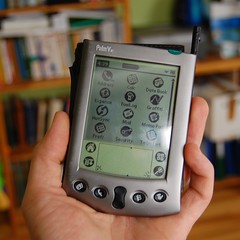
Recently, my Palm died on me due to me neglecting to charge it and brought with it more than a year's worth of statistics of my car's fuel useage, petrol prices, and mileage. Surprisingly from today's standpoint, Palm's memory is not flash and has to be powered in order to keep its contents. If the battery discharges, the device returns to the factory state.
I have owned and used a Palm Vx since 2001. For the last couple of years I have been using it for only two applications: storing passwords in Keyring and keeping tabs on my cars' fuel usage with Fuel Log. Both of these programs are GPL licensed. I've migrated passwords to pwsafe on the laptop a couple of months ago. Now that the fuel log is gone, there's nothing binding me to it.
Sounds like a good opportunity to retire the Palm at last.
I will always have fond memories of this little device. A truly portable PDA, less than 1 cm thick, the weight that does not strain a shirt pocket, battery charge good for several weeks of standby time or 20 hours straight of reading of e-books (tried that). The screen is laughably low-res by today's standards (160x160 pixels). Nowadays most mobile phones have a higher resolution screen. However it was very comfortable on the eyes, and the green inverse backlight was very pretty, was very comfortable in darkness, but made the screen pretty much useless in twilight.
Oh, the thousands of pages of books I have read on this thing! It was so convenient. I had Palm with me at all times and could delve into the book I was reading at the time at each opportunity: a long line in the supermarket, in the doctor's lobby, in bed at night, sunbathing at the lake, anywhere! I could look up a rare word by just clicking on it and switching to the dictionary app. I could not agree more with everything John Siracusa has to say about the Palm e-book experience in his excellent article on the history of e-books.
Palm had a great set of PIM applications: Notes, Address book, To Do. These were really excellent and served their purpose very well.
Miraculously, my Palm's Lithium battery is still working, about 9 years from production! Other things have obsoleted the device: my current laptop (Thinkpad X61s) does not have neither RS-232 nor IrDA ports, and these two are the only communication channels on the Palm. The 8 MB of memory were enough 7 years ago to keep several books and an assortment of useful programs, but are laughable today. But even in its heyday, getting online not too comfortable: if there was no table around, you had to balance the Palm and the mobile phone on your knee with their infrared ports aligned, and the 9600 bps dialup on GSM was slow by any standards, and there was no web browser, at least a free software one.
Later offerings from Palm Inc. were faster, brighter, more capable, more powerful, and more expensive, but lost to Palm V in several important respects: size, weight, and battery life.
So, anyway, I need a new fuel log application, and I know the device where I want it. My S60 mobile phone. I also have it with me at all times, it's always on and ready to roll, and it holds its charge for many^H^H^H^Hseveral days. And i'm going to write it in Python.
2008-09-18
Hardware problems with OLPC XO-1: my 2 cents
Problem: my kid's XO wouldn't turn on. The power light would go on, but the screen would stay dark. And it wasn't just the backlight. There was no startup sound as well. Powering on while holding D-pad left did start the hardware diagnostics, but the machine turned off in the middle of the test and wouldn't come back up.
On the OLPC wiki I found excellent information on startup diagnosis, but my symptoms weren't there. The next step was to use the excellent disassembly instructions and look for a connection shaken loose or some mechanical damage.
XO is really beautiful inside. Looks very sturdy, also it looks simple and sophisticated at the same time. Mostly everything is in the top part, behind the screen. There are only ~9 wires coming from the bottom: 2 from the battery, another small 2 wire connector (battery temperature sensor or something like that) and a 5-wire keyboard cable. It took me a minute or two to identify the problem.
Solution: remove the 2 cents coin from the SD card slot!
P.S. Also, I checked out the firmware easter egg (power up while holding D-pad right). Nice!
On the OLPC wiki I found excellent information on startup diagnosis, but my symptoms weren't there. The next step was to use the excellent disassembly instructions and look for a connection shaken loose or some mechanical damage.
XO is really beautiful inside. Looks very sturdy, also it looks simple and sophisticated at the same time. Mostly everything is in the top part, behind the screen. There are only ~9 wires coming from the bottom: 2 from the battery, another small 2 wire connector (battery temperature sensor or something like that) and a 5-wire keyboard cable. It took me a minute or two to identify the problem.
Solution: remove the 2 cents coin from the SD card slot!
P.S. Also, I checked out the firmware easter egg (power up while holding D-pad right). Nice!
2008-06-22
The joys of Linksys WRT 54GL
On Friday there was a thunderstorm. Usually during the storms the surge protection in my radio link antenna's power-over-ethernet power supply trips up and needs to be reset by disconnecting the PSU from the mains for around 10 minutes. This time the usual measure didn't suffice. The lights on the adapter came up, but still there was no connectivity. I reported the problem to the ISP's tech support. The next day the engineer rang up and said that he can connect to the dish at my side.
I connected a laptop directly to the uplink cable, configured the static IP address. Lo and behold, the pings go through. Apparently the uplink Ethernet port on my OpenWRT router got fried.
Luckily, this router does not just have an uplink port and four lan ports, it has a programmable switch and an open firmware (OpenWRT 7.09 "Kamikaze") lets me tap into it.
I looked at /etc/config/network, and found the following lines at the top:
vlan0 is the internal lan, 0-3 are the external lan ports, and 5 is the host port. vlan1 connects the uplink port (4) to the router (5). The asterisk probably means packet tagging. As the router internally has just one physical ethernet port, the internal and external interfaces are virtuals employing the same physical interface. Their packets are distinguished by tags.
So, I changed the config thus:
I rebooted the router and plugged the blue uplink cable into the first LAN port (the numbering of the holes on the router is backwards). Tada! Here's my Internet connection again!
I connected a laptop directly to the uplink cable, configured the static IP address. Lo and behold, the pings go through. Apparently the uplink Ethernet port on my OpenWRT router got fried.
Luckily, this router does not just have an uplink port and four lan ports, it has a programmable switch and an open firmware (OpenWRT 7.09 "Kamikaze") lets me tap into it.
I looked at /etc/config/network, and found the following lines at the top:
#### VLAN configuration
config switch eth0
 option vlan0 "0 1 2 3 5*"
 option vlan1 "4 5"
vlan0 is the internal lan, 0-3 are the external lan ports, and 5 is the host port. vlan1 connects the uplink port (4) to the router (5). The asterisk probably means packet tagging. As the router internally has just one physical ethernet port, the internal and external interfaces are virtuals employing the same physical interface. Their packets are distinguished by tags.
So, I changed the config thus:
#### VLAN configuration
config switch eth0
 option vlan0 "0 1 2 5*"
 option vlan1 "3 4 5"
I rebooted the router and plugged the blue uplink cable into the first LAN port (the numbering of the holes on the router is backwards). Tada! Here's my Internet connection again!
2008-06-19
Huawei E220 USB HSDPA modem on Linux
Tested on Ubuntu Hardy. When you plug the modem in, things happen:
As you can see, we get two serial ports and a CD-ROM drive. The second serial port and the CD-ROM drive can be ignored. PPP works straight away with the following config:
Here's the e220 chatscript (put in into /etc/chatscripts, replace the "****" with your pin code, replace "omnitel" with your provider's APN):
[ 1872.829603] usb 5-2: new full speed USB device using uhci_hcd and address 11
[ 1872.988741] usb 5-2: configuration #1 chosen from 1 choice
[ 1872.998189] usb-storage: probe of 5-2:1.0 failed with error -5
[ 1872.998226] airprime 5-2:1.0: GSM modem (1-port) converter detected
[ 1872.998441] usb 5-2: GSM modem (1-port) converter now attached to ttyUSB0
[ 1873.006403] usb-storage: probe of 5-2:1.1 failed with error -5
[ 1873.006437] airprime 5-2:1.1: GSM modem (1-port) converter detected
[ 1873.006615] usb 5-2: GSM modem (1-port) converter now attached to ttyUSB1
[ 1873.057365] scsi30 : SCSI emulation for USB Mass Storage devices
[ 1873.058803] usb-storage: device found at 11
[ 1873.058810] usb-storage: waiting for device to settle before scanning
[ 1876.078727] usb-storage: device scan complete
[ 1876.082294] scsi 30:0:0:0: CD-ROM            HUAWEI   Mass Storage     2.31 PQ: 0 ANSI: 2
[ 1876.117573] sr0: scsi-1 drive
[ 1876.117674] sr 30:0:0:0: Attached scsi CD-ROM sr0
[ 1876.117754] sr 30:0:0:0: Attached scsi generic sg1 type 5
As you can see, we get two serial ports and a CD-ROM drive. The second serial port and the CD-ROM drive can be ignored. PPP works straight away with the following config:
noauth
connect "/usr/sbin/chat -v -f /etc/chatscripts/e220"
debug
/dev/ttyUSB0
230400
crtscts
defaultroute
noipdefault
user ignored
remotename whatever
ipparam whatever
usepeerdns
Here's the e220 chatscript (put in into /etc/chatscripts, replace the "****" with your pin code, replace "omnitel" with your provider's APN):
# Chat file for Huawei E220 HSDPA USB modem
ABORT BUSY ABORT 'NO CARRIER' ABORT 'NO ANSWER' ABORT DELAYED
'' AT
OK AT+CPIN="****"
OK ATX3
OK 'AT+CGDCONT=1,"IP","omnitel"'
OK ATDT*99***1#
CONNECT ""
2008-06-08
New phone
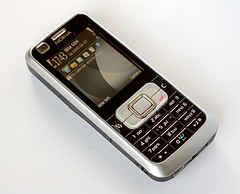
I got a new phone on Thursday, Nokia 6120 classic. It is my first Series 60 phone. I have been a loyal Nokia user for around four years now, mostly because of the ubiquity and universality of Nokia chargers. During the whole time they were producing GSM handsets, Nokia has changed the charger connector only two times. Each time the change was motivated by miniaturization.
Series 60 3rd edition is very nice. The UI metaphor is different from Series 40, but it's quite intuitive and comfortable. Surprisingly, there's no stopwatch app, but of course there already are too many Stopwatch apps for S60 on the web. Should I write another one? :-) There's a snag that this phone is not yet supported by Gnokii/Gammu/Wammu, so I had to install the Nokia PC suite on Windows in order to transfer my contacts from my old Nokia 6230i. Know what? It was not flawless. Getting the contacts from the 6230i was easy (if we ignore the constant Vista disk grinding), not so with restoring the backup on the 6120c. It took Nokia PC suite 3 attempts to create the Bluetooth pair, install the drivers on the PC and on the phone, and connect to the phone.
The phone has all the 3G technologies: UMTS, HSDPA. During my first Internet connection test on a late Thursday evening speedtest.net indicated 1.2 Mbps down and about 100 kbps up with a 3.5G (HSDPA) connection. On a Saturday night though the speed fluctuated between 300-600 kbps on average, and it took a couple of attempts to establish an HSDPA connection, I would get EDGE instead. I'm using the Bitė GMS network. We'll see how things will go with Omnitel.
Yesterday I installed Python on the phone. I set up and played with a Bluetooth console. The Hardy bluez-utils are broken (see Ubuntu bug 211525), so I had to install bluez-utils from Sid. The Bluetooth console is much more convenient than banging in Python code on the phone keyboard, but it does not have readline.
I got an impression that Nokia wants people to use Python on Series 60 very much. They try very hard to make it easy, provide all sorts of docs, even multimedia tutorials. Probably they see the ease and accessibility of Python as a path to widespread platform adoption. The Python API has easy access to most of the phone's functionality, including the GUI toolkit, camera, bluetooth, networking, messaging, contacts and so on. I have an impression that cooking a homebrew contacts backup/restore application in Python will be pretty trivial. I cannot start hacking away as Python looks for modules on the flash card, and I haven't bought a microSD card yet. On a positive note, it's nice that this time Nokia didn't include a cheap claustrophobic-sized card. They're useless after you buy a real card, but hard to throw away, so they contribute to cruft accumulation in life.
Unfortunately, Nokia only provides the platform SDK for Windows, but there are ways to use the GNU toolchain in combination with the SDK and some Wine.
The SDK is needed in order to package Python scripts as SIS installable files. Even then, I'm not sure it will work, as Series 60 3rd ed. only accepts packages signed by a registered developer. There should to be a way to play with your own software, no idea yet what's involved.
2008-04-30
Seasonal headache: ABBYY eFormFiller 2.5 on Linux
The beginning of May (May 6 this year) is the deadline for income tax declarations in Lithuania. Our tax inspection accepts paper forms, has a lame web interface, and offers a Windows program that looks nice, calculates all the derived values for you, and has validation. There are some problems with running it on Wine. Last year I tried getting it to run for a couple of hours, then gave up and booted Windows on one of the laptops.
This year around, I made an effort and finally got it to run. Here are the commands that made the cut for me (Ubuntu Hardy, Wine 0.9.59):
I hope it will be useful to somebody.
Update: naaaah, it works with the last year's income tax form, but doesn't with this year's. Time to boot Windows again :(
This year around, I made an effort and finally got it to run. Here are the commands that made the cut for me (Ubuntu Hardy, Wine 0.9.59):
mkdir /tmp/formfiller
cd /tmp/formfiller
wget -nv http://deklaravimas1.vmi.lt/eFormFiller25v6_2008_03_06.zip
unzip eFormFiller25v6_2008_03_06.zip
wget -nv http://kegel.com/wine/winetricks

export WINEPREFIX=~/.wine-eFF/
wineprefixcreate

sh winetricks dcom98
sh winetricks win98
sh winetricks riched20
sh winetricks vcrun6
sh winetricks wsh56

wine setup.exe /q

wine $WINEPREFIX/drive_c/Program\ Files/ABBYY\ eFormFiller\ 2.5/FormFillerLight.exe
I hope it will be useful to somebody.
Update: naaaah, it works with the last year's income tax form, but doesn't with this year's. Time to boot Windows again :(
2008-04-02
Oh, the convenience!
I was browsing around for hotels close to the Europython 2008 conference venue (Reval Hotel Lietuva). I remembered that the classic Soviet-decorated Neringa hotel is 10 minutes away, just across the pedestrian bridge between the banks of Neris. Unfortunately, Scandic Neringa does not have any rooms available for the duration of the conference, but they suggested another hotel nearby.

Your daily commute: 1250 km in each direction.


Your daily commute: 1250 km in each direction.
2008-01-11
Schneier on open WiFi
I've been running an open WiFi network at home (and at the office as well). Turns out, the security guru Bruche Schneier does the same, as he writes in his article "Steal This Wi-Fi". Not only Schneier puts down in words my own vague moral arguments for doing so, but also assesses the risks associated with the practice of running an unsecured wireless network.
So, whenever you come by my house, be my guest and use the WiFi. By the way, my ESSID conveys this in Lithuanian: "Skanaus".
So, whenever you come by my house, be my guest and use the WiFi. By the way, my ESSID conveys this in Lithuanian: "Skanaus".
2007-12-19
So true
Java is like a variant of the game of Tetris in which none of the pieces can fill gaps created by the other pieces, so all you can do is pile them up endlessly. -- Steve Yegge
2007-10-05
2007-10-03


Façade-salade
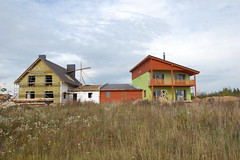 Last week we had the façade of our house painted. We wanted a lively colour, but misjudged the one we've chosen a bit. Now our house glows in sunlight like a green pack of Skittles. The photos don't convey the real intensity of the colour. Ladybugs and caterpillars are mistaking it for a giant off-season lettuce leaf. Photos of said insects might follow.
2007-07-05
Learn from the Masters
Here's a little gem of a Python line from Phillip Eby (setuptools.package_index):
Kids! Don't do this at home!
self.index_url = index_url + "/"[:not index_url.endswith('/')]
Kids! Don't do this at home!
Subscribe to:
Posts (Atom)
